Pages

Thursday, May 14, 2015

What is ISTE? (Part 3: From the Comfort of your Couch)

In previous posts you learned about the International Society for Technology in Education [What is ISTE? (Part 1)] and how to stay connected all year long [What is ISTE? (Part 2: ISTE throughout the year)]. But traveling to Philadelphia for this year’s annual conference might not be in the cards for you. Never fear—this blog will help bring ISTE to you!  You can attend ISTE sessions online June 28- July 1 and follow the conference hashtag #ISTE2015.
One way to attend ISTE remotely is to participate virtually with ISTE Live. ISTE Live offers you the opportunity to attend three days of sessions from the comfort of your couch. For a fraction of the conference registration costs, you can connect to all three keynotes, over 15 sessions, and multiple peer networking opportunities. Each session recorded for ISTE Live will be moderated by a volunteer that will facilitate an online Q&A. In fact, nine of the moderated sessions will be moderated by your very own BVSD Ed Tech team members. We hope to see you online at ISTE Live!

In addition to attending live recorded sessions, you can connect to ISTE for free through the power of social media. Twitter, Google+, Instagram, and more are all used by ISTE attendees to share their professional development and learning connections. Use the hashtag #ISTE2015 to join in the conversation. Educators are already posting, so jump in now and don’t miss out!

Save the Date: Mark your calendars for the summer of 2016, when Denver will host the ISTE conference in June. This is an opportunity you cannot miss!

Tuesday, May 5, 2015

Digi Day 2015 Recap

On Saturday, April 25, over 160 educators and staff attended the 3rd annual Digital Innovative Learning Day at Angevine Middle. This high-energy day of learning and inspiration directly supported BVSD’s Success Effect strategic plan, specifically the ‘Nurturing Talent’ component, which addresses ongoing professional development and tapping into the passion of educators.
DSC_7898.JPG

The theme for the day was “OK to Play, OK to Fail”, a mindset that encourages people to take risks, try something new, learn from their mistakes, and try again. This theme was embedded throughout the workshop.

Our morning keynote was given by Travis Allen, founder of the iSchool Initiative. This inspiring and passionate young man challenged all of us to embrace the growth mindset, and to move from being anchors to being sailboats in the sea of lifelong learning.
DSC_7917.JPG
Travis Allen delivered the morning keynote address.
Throughout the day participants attended 3 learning sessions, choosing from a total of 27 offerings hosted by BVSD educators, administrators, and special guests. Sessions included:


DSC_7986.JPG
Jamie Smith and Mary Waddell, both teachers from Nederland Elementary, led a session called "Making Information Text Accessible for Primary Students".

Between each session, participants shared, learned, and laughed during built-in collaboration times. For those moments when technology wasn’t cooperating, we had tech medics and members of IT on hand to handle technical difficulties.
DSC_7822.JPG
IT members Joni Gates, Doug Healy, and Andrew Moore were on hand for support.

Our lunch keynote was given by Ed Tech Specialist Erika Morreale with her guest, Columbine Elementary teacher Susan Parsons. Their stories reiterated our theme of “OK to Play, OK to Fail,” with a special emphasis on the growth mindset and becoming a lifelong learner.
DSC_8083.JPG
Erika delivered the lunch keynote.
Our amazing and generous sponsors helped make the day more fun. Otterbox donated cases for our prize raffle; reps from CDW, Schoology, and Tech4Learning were there to support teachers, answer questions, and help facilitate sessions; and Jason’s Deli helped pay for our lunch and gave out coupons. We couldn’t have done it without our sponsors!

So what did our participants have to say about Digi Day?
“I love the opportunity to work with and learn from colleagues!”
“It was worth giving up a Saturday.”
“It was an awesome, inspiring day! Thanks!”
“I learned something in every session I attended.”
“I liked the keynote presentations! I also appreciated that they were given when nothing else was scheduled. I liked hearing about different people's technology experiences.”

DSC_8025.JPG
Participants dressed up at the photo booth.
Digi Day participants engaged in a vibrant backchannel conversation on Twitter during the event using the hashtag #digidaybvsd. Here are just a few comments:
Twitter clip.jpg

100% of Digi Day participants who responded to our survey said they would recommend that their colleagues attend a Saturday Workshop provided by BVSD’s Ed Tech Team. That makes us even more excited to expand this event on August 3 & 4 when we host Digi Fest. Mark your calendars—more info is coming soon!
DSC_7838.JPG
The Angevine library was filled with energetic, engaged educators.


Thursday, April 16, 2015

An Overview of Digital Citizenship


Learning with technology, whether with a math app, a video how-to, or a wiki, opens up a new world of discovery for kids. As students access information in more connected ways, they are preparing for life in a new interconnected, global world. Due to this new connected way of learning, instruction in digital citizenship is more important now than ever before.DSC_7512.JPG

What is Digital Citizenship?

Digital citizenship is more than internet safety. It encompasses the norms of appropriate, responsible behavior with regard to technology use that everyone, adults and kids alike, should adopt in order to have a productive, meaningful, and safe online presence.


Digital citizenship instruction typically consists of eight main components:
  • Internet Safety
  • Digital Footprint & Reputation
  • Privacy & Security
  • Self-Image & Identity
  • Relationships & Communication
  • Information Literacy
  • Cyberbullying
  • Creative Credit & Copyright


As you can see, digital citizenship addresses many facets of a person’s digital presence, including relationships, self-image, and communication. It is increasingly important that we provide students guidance in these areas as they engage more with online learning communities.

Resources for Schools

BVSD Ed Tech supports teachers and administrators when they have questions about how they can incorporate digital citizenship into their instruction and school culture. We recommend that each school builds a digital citizenship plan following the Common Sense Media scope and sequence. You can find this scope and sequence broken into grade level specific lessons on the BVSD Ed Tech Digital Citizenship website. You are also welcome to visit our Bundlr page where we curate resources on digital citizenship.


Please contact an Ed Tech team member if you have any questions about digital citizenship in BVSD.

Thursday, April 2, 2015

Blogging: A 21st Century Communication Tool


What is a blog, and why should I start one?
Blogs, short for ‘web logs’, have increased in popularity over the last ten years. They combine social media and communication to reach a wide audience via the Internet. A blog looks and acts like a website, yet with some important differences.
  • It is organized in a journal format with dated entries. The content is displayed in sections with the most recent submissions at the top. Readers can scroll down through the blog to read past entries. It is a relatively simple way to post and share information with an audience.
  • The journal-entry style of the blog lends itself to being updated more often, as the blog posts can be regular updates or information in a conversational style, rather than updating all the content on a website.
  • A blog can also be utilized as a Web 3.0 tool where the audience can interact and comment as well.
  • Lastly, a blog can be shared as easily as sending a link, making it an important communication tool to keep your community up to date with information and events in a easy to access, easy to manage fashion. Your audience needs the blog link just once, then can revisit the page as often as they'd like and get the most updated posts.
  • A blog will widen your digital presence and help you reach a vast audience.


How to Blog
There are numerous platforms you can start blogging from. Blogger is an excellent option, as it is connected to your Google account. Using these five steps, you can have your blog up and running in about 30 minutes!


  1. Start using Blogger by signing in with your Google Account. After signing in, you will land on your Dashboard.
  2. Click on ‘New Blog’. It will walk you through the steps to give it a title, address, and apply a template to your blog.
  3. Back at your dashboard, you can add your first blog entry. Click on the pencil icon next to the name of your blog. A page similar to a word processing document will open where you will compose your message. You can change fonts/sizes, add graphics, links, and video. When you are finished, you have a few options:
    • ‘Save’ will save your work, but not publish it on your live blog. 'Publish' will both save and publish it.
    • 'Preview' will let you take a look at your published entry.
    • You can revise your entries even after they have been published!
  4. Anytime you want to get back to your Dashboard, click on the Blogger word or icon in the upper left-hand corner of your screen. To see what your blog will look like, click on ‘view blog’.
  5. There are a few key features you will want to play with. From your Dashboard, click on the arrow next to the ‘pieces of paper’ icon, and select ‘overview’.
    • Use the ‘Layout’ feature to add parts to your blog.
    • Use ‘Google+’ to associate your profile with the one you have set up in your Google+ account (optional).
    • Check out ‘Settings’ to manage posts and comments on your blog.
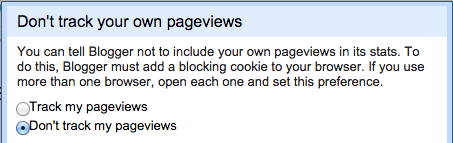
    • In ‘Stats’, set so your statistics will not count your own pageviews in the data.


There are many, many ways to customize your blog. Here are some resources to help guide you.


BVSD Blogs 
  • Superintendent's Blog - Dr. Bruce Messinger, BVSD Superintendent
  • Principally Speaking - John Riggs, Manhattan Middle School Principal
    • Note: John created his blog during the last ‘Principal’s Coffee Chat with Ed Tech’. The next Coffee Chat is for Elementary Principals, scheduled for April 14 from 2:00-3:00pm in the IT Copper Lab. We hope to have a crowd of Elementary leaders there to create their own blogs!
  • Douglass Elementary Blog, via LinkedIn - Jon Wolfer
  • Technology Blog - Andrew Moore, CIO
  • BVSD Ed Tech Blog
Award-winning Blogs from around the country


Friday, March 13, 2015

What is ISTE? (Part 2: ISTE throughout the year)

In February you learned about What is ISTE? (Part 1) and we focused on the tech conference sponsored every summer by The International Society for Technology in Education (ISTE). Hopefully excitement and interest has increased and you are eager to connect and learn this summer! But ISTE is more than a four day event, more than a conference, and more than Philly cheesesteaks. ISTE is a network of educators, resources, standards, hopes, and classroom ideals that sustain an active, year-round society. Let’s look at some highlights of the ISTE website.
  • Professional Resources—free!! podcasts, articles, videos and more
  • ISTE standards that focus on creativity, communication, collaboration, creative thinking and  problem solving skills for use at all grade levels in all content areas


Stay tuned for What is ISTE? (Part 3: From the Comfort of your Couch) that will be published on this blog coming in April. Also, get excited for ISTE to come to you! Denver will host the conference in the summer of 2016. This is a conference you cannot miss!

<http://formulateinfinity.net/wp-content/uploads/2014/07/Connect-with-ISTE1.jpg>
<https://isteemergingtech.files.wordpress.com/2007/05/iste_nets-srefresh.jpg>

Thursday, February 19, 2015

Monarch High BYOD Update

Four years ago, Monarch High embarked on a groundbreaking journey, a BYOD initiative that would make them a 1:1 school in four years. It was a project that required the efforts of everyone in their community: students and teachers, parents and business leaders, and district Ed Tech, IT and administration. It was a change that was much bigger than devices; it was about a shift in school culture, professional development, and instruction. Now that four years have passed and the entire school is 1:1, let’s see what has changed at Monarch High.
Sra Farrell 17

New Tools
Moving from paper to digital tools is what is known as Substitution on the SAMR model of technology integration. SAMR (Substitution, Augmentation, Modification, Redefinition) describes how technology can be used in increasingly effective ways in the classroom. For many who are newer to technology, the Substitution phase of SAMR is the first step in a transformative journey, and this is where many at Monarch High began four years ago.


Today, most teachers and students at Monarch High rely on several key digital tools. They use an online Learning Management System (LMS) daily for posting assignments, mediating classroom discussions, and grading. Students access the LMS every day to obtain class resources, partake in the discussion board, take online tests, and submit assignments. Most classes also use a tool called Turnitin to teach students how to avoid plagiarism and develop a strong writing voice. Finally, students experience differentiated assessments through Voicethread, Vocaroo, WeVideo and other online tools.


School Culture
A school’s culture is what ultimately makes a change successful. The introduction of devices into Monarch was more than just a logistical feat; it was a challenge for individuals and for the entire school culture. Over the last four years, Monarch High teachers have shifted away from fear or distrust of technology to seeing technology as integral to instruction. Teachers are taking more risks, asking for more support and training, and collaborating with each other more. Resistant teachers are no longer resistant. They are now the first ones to say, "If this tool goes away, I will have to quit teaching!"


Student culture has been changing, too. Instead of turning in homework, they publish it online for a global audience. Instead of working in isolation, they work with each other and with experts around the world. For students, it has become second nature to capture and share their thoughts in collaborative tools like Google Docs.
Sra Farrell 16

Professional Development
One reason for the cultural shift at Monarch High was professional development support. It wasn’t just a matter of learning new tools, although that part shouldn’t be overlooked—rather, teachers were expected to change their approach to instruction as a result of using these tools, and this is happening because of a commitment to ongoing professional development.


Over the last four years, teachers have experienced a wide range of PD opportunities. They have attended training within their school teams, district PD from the BVSD Ed Tech team, and statewide conferences. In the 4th year, a part-time technology integration specialist position was created to help teachers reach the next level in their growth. Monarch also has a team of teachers who help plan and deliver professional development so that they can differentiate for the needs of their school.


Monarch instructors still have a long way to go, but a culture has been built that supports each teacher at their skill level. Now, teachers and administrators truly own their learning by setting personal goals, documenting evidence of their growth in online portfolios, and continually seeking to improve their pedagogy.


Transformative Instruction
The most profound transformation at Monarch High has been in instruction. Teachers are thinking bigger than just substituting a digital tool for a piece of paper, they are considering how they can leverage all kinds of tools to redefine instruction. In other words, they are reaching for the highest levels of the SAMR model.


Students are more engaged because they are participating in authentic learning and connecting with other students around the world. Their class time consists less of lecturing and more of inquiry and problem-based learning. They create reflective blogs and online portfolios to showcase their projects. Their homework is transitioning from paper to multimedia products that are published to a worldwide audience. You can see examples of these amazing projects, as well as a tool of the month, on the MOHI BYOD website.  
Complex #s R.Lieberman3

Monarch and Beyond
The vision that Monarch started on this journey four years ago has picked up speed throughout BVSD. There are now similar efforts in several schools around the district—Eldorado K8, Bear Creek Elementary, Angevine Middle, and most notably at Centaurus High, where a 1:Web initiative is underway. With enough funding, we hope to move the entire district to 1:Web. Through it all we can reflect on Monarch High’s transformation as an example of what can happen when tools, instruction, culture, and support at the school and district level come together to create a learning environment where students thrive.