Pages

Showing posts with label Vision. Show all posts

Monday, April 16, 2018

Guest Blogger - Erin Mayer | The Road Less Traveled - Going Gradeless


Erin Mayer, Science Teacher | Casey MS
21st Century Cohort 4.0
@Erinsmayer | www.reinventingclass.com


The Road Less Traveled - Going Gradeless

After a successful trial run last spring eliminating grades in lieu of feedback and reflection with my eighth grade science students (The Road to Gradeless), I decided to completely eliminate grades for all 155 of my sixth and seventh grade students this year. In September, after I felt that my students and I had begun to create and develop a collaborative, safe, learning community, I explained to my students that because our primary focus throughout the year would be learning and understanding, they would receive learning feedback from me, not grades. With the full support of my administrators, I also shared my vision with my student’s families (Learning and Grades Parent Letter).

To provide and document feedback on student learning and understandings, I use Schoology in conjunction with single point rubrics focused on our learning criteria.
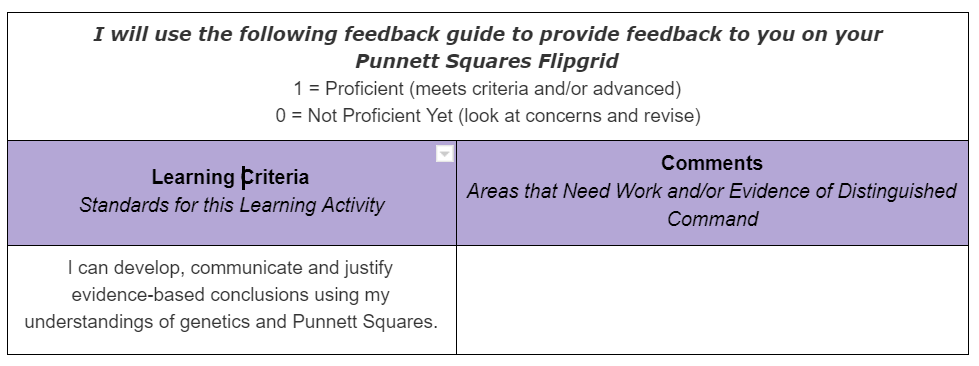
If a student learner has met the learning criteria, they receive a “Proficient”. If they have not met the criteria, they receive a “Not Proficient Yet”. I include concerns, questions and evidence of advanced understandings in the comment column of the Schoology “gradebook”. I emphasize the “yet” in not proficient yet, consistently acknowledging and reminding my student learners that the learning process is messy and that it is often necessary to traverse multiple learning paths and revision processes to develop, refine and communicate understandings and ideas.

Our school is on a quarter system and I still need to submit traditional letter grades each quarter. At the conclusion of each quarter, my seventh graders reflect on and evaluate their learning using a Personal Learning Reflection and Evaluation template that I share with them. At the conclusion of this document, each student determines what their quarter grade will be. Students mini-conference with me after completing their reflection. These conferences are critical and allow my students and I to dig deeper into their personal reflection and evaluation of their learning. Our class is self-paced which allows us to mini-conference during class time because all students reach the unit evaluation and reflection phase at different points.

I discovered that my sixth grade students need more scaffolding to reflect and evaluate on their learning. Their most recent reflection, after a quarter-long problem based unit focused on bioplastics, provided this additional structure and focus: Polymers for the Planet Individual Learning Reflection.
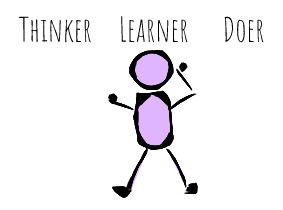
Overall, the feedback I have received about our gradeless learning environment has been positive. Parents and family members appreciate our emphasis on learning and communicating understandings. At this point in our journey, most of my students have developed a deeper understanding of what gradeless means. This has been a transition for many students, particularly my seventh graders. An emphasis on learning and understanding over grades requires students to own their learning. Their experiences in our science classroom are helping them understand that learning is messy. They are realizing that it is okay, and often beneficial, to slow down and focus more deeply. They are more aware that the ability to communicate their understandings, in ways that work best for them, is critical and can be very rewarding. As my students’ learning facilitator, our experience has convinced me that a gradeless environment is best for kids. It provides the opportunity for all of my students, many who are often labeled as “underperforming”, to find learning success in our science classroom and ultimately allow to develop their capacities as thinkers, learners and doers.


Tuesday, January 13, 2015

Don't Turn It In: Publish It!

 Don’t Turn It In: Publish It!


  • “Is this for a grade?”
  • “Will this be on the test?”
  • “My printer ran out of ink so I can’t turn in my paper.”
  • “Why are we doing this?”
  • “Are you the only one who looks at this or is it for a bigger audience?”


Turning in Work by Publishing!

While the above questions might be familiar, they are often times irrelevant in the modern classroom. Now, our students have an opportunity for learning and assessment beyond the traditional model of turning in work. No longer are students or teachers limited by the process of submitting work to be graded by a teacher with little to no impact beyond the four classroom walls. With access to the world around them, students realize they can publish their work beyond their teacher, impacting a wider audience and, ultimately, increasing their engagement of the learning and project they are completing.

See examples of the possibilities below from students and teachers in BVSD

Did You Know? All of the projects below were graded electronically!

In Language Arts…
  • Students create book trailers as a way to assess their understanding of content, deeper literary elements (character, setting, etc.) and to increase student engagement. (8th grade)
  • Students wrote, illustrated and then made a video to share their beautiful watercolor artwork and imaginative "If.." book inspired by Sarah Perry's book. (1st grade)

In Science…
  • Students create online, collaborative posters with research about the periodic table of elements demonstrating understanding and application of the information (6th grade)
  • Students publish their animal research by creating a website to share with each other and their families. (3rd grade)
  • Students create videos that analyze and explain the parts of a cell. The videos are linked to a Google drawing that connect to that cell. (10th-12th grades)

In Math…
  • Students demonstrate their understanding of math skills (addition with proofs) by creating videos teaching the skill. (2nd grade)
  • Creating original thinking with systems of equations and demonstrating this learning in a presentation (6th-8th graders)  
  • Students analyze and connect math proofs to real-world issues and provide a solution by creating videos and collecting the resources in an online document. (10th-12th grades)

In Social Studies…
  • Students create digital, interactive posters that presents their research on an explorer. (5th grade)
  • Students synthesize their research of The Americas and create an online digital atlas. Then, they share with other students in the class so they can learn from each other. (6th grade)

In World Languages…
  • Students create, perform, record and publish Latin plays to learn, understand and analyze various chapters for learning. These recordings are now being used all over the country for students in other Latin classes. (9-12th grades)
  • Students create a final product for their Spanish class that captured and applied the themes they had learned through the course of the year. This particular student chose to create a website. Along with this website, students created videos and articles to publish as content on the site. (10th-12th grades)

In Music…
  • Students analyze and publish their thoughts regarding their musical selections and performances through a blog and through individual reflections of performances in a Google Form. See this portfolio for even more examples! (6-8th grades)

In Art…
  • Students create original projects/designs for a variety of purposes and student-determined audiences in this digital art course. Two examples: Ad Campaign and Book Cover design (9-12th grades)

In Health/P.E.
  • Students are monitoring heart rates using iPad apps (6th-8th grades)

Interested in learning more? Any BVSD educator to leave a comment as a response to this blog will be put into a drawing to win a copy of  Role Reversal: Achieving Uncommonly Excellent Results In The Student-Centered Classroom  Must leave a comment by February 2nd to be considered for the drawing!

A special thanks to the following educators whose student work is featured in this blog post!

Megan Cosmos*
Gregg Cruger
Kristin Donley
Melissa Duplechin*
Rebecca Feeney
Josh Feiger*
Lynn Gibert*
Rachelle Lieberman*
Lisa Norton*
Ingrid Parker*
Korrie Skibinski*
Janelle Stanton*
Caitlin Thomas*
Mary Waddell*


*21st Century Cohort Member

Wednesday, August 21, 2013

Core Software in BVSD: From Many to Most Impactful


What tools are your students using in the classroom? What types of devices are in your school? Students in Boulder Valley have access to iPads, laptops, Chromebooks, netbooks, PCs, Macs, and more, in addition to their personal devices. This shift in the variety of tools that students use in turn impacts educational software: it needs to be available on any device, anytime, anywhere. This requirement has driven a fundamental change in Core Software in BVSD.


For several decades, the number of Core Software titles grew until they were unsustainable. We began to experience incompatibility issues between older software titles and newer computer technology. At the same time, the nature of how we delivered instruction using technology also changed. The need to purge and reassess became imminent. We realized that we needed to refine our software titles and adoption process, similar to how teachers continually refine their lesson plans.

That need prompted an inquiry process that began in September 2011 by a group of community stakeholders called the Educational Technology Leadership Council (ETLC). This group helped guide the vision of the ideal learning environment in Boulder Valley. Building on that vision, an internal cohort of administrators, teachers, and specialists inventoried our software titles, which topped out at over 80, and planned a course of action to make necessary improvements.

The next steps included district-wide surveys, conversations with stakeholder groups such as teacher-librarians, curriculum directors, tech contacts, as well as all levels of IT. The results of these conversations led to weeding titles that were antiquated, for examples those purchased in 1985. New titles were measured against the ETLC vision for the ideal learning environment and balanced with financial needs and meeting anytime, anywhere access for students.

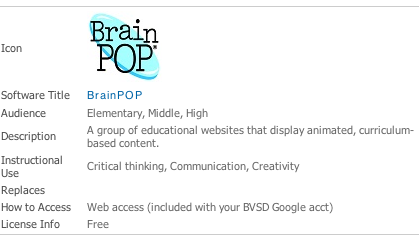
As a product of this work, Ed Tech has created a Core Software website that showcases a “Supported Core Software List”. For each educational software title, this list shows where it can be accessed, its instructional use, and related information.  Scrolling down the page, there are titles that have reached their “End-of-Life” and are no longer supported by the district. If your favorite title is on this list, you can find an upgraded alternative in the “Replaced by” section.


Schools seeking training on Core Software titles have many experts and training opportunities available to them. For example, each school’s Tech Contact and Teacher Librarian have been offered training on many key software pieces—these staff members are excellent resources. In addition to the expert in each building, Ed Tech is offering several Professional Development Opportunities starting with a Core Software Open House on Wednesday, September 25th. Check out the BVSD Ed Tech website for more resources about Core Software.

Monday, November 19, 2012

A New Direction

The Educational Technology Department recently underwent a year of strategic visioning and planning. Through this process, a group of teachers, students, administrators, and community members created a new mission and vision for the department. Our mission now reads:

The BVSD Educational Technology Department will support the development of standards-based, 21st Century Learning Environments that foster high levels of student achievement through exemplary instructional practice in the application of educational technology.

Today, students are living in an increasingly diverse, globalized, complex, and media-saturated world. This rapidly changing environment requires a new approach to learning. The next generation will be required to adapt and handle change better than any other generation. Students see this change coming; they’re living it now. As a result, “Today’s students want to learn differently that in the past. They want ways of learning that are meaningful to them...and ways that make good use of the technology that they know is their birthright.”1 While our “digital natives” excel at using this emerging technology for entertainment, it does not necessarily mean that they know how to use these tools for educational purposes. It is our job to teach them how to use technology to collaborate, research, problem solve, think critically and create new knowledge, while also empowering them to find relevance in their learning by providing real-world learning opportunities and audiences. This is the 21st Century Learning Environment.

Interestingly, this new environment has less to do with teaching technology tools and more to do with teaching the behaviors and approaches towards these ever-changing tools. A teacher must understand the balance between tools and learning. While the tool is important because it is the language of our students, the tool itself is less important than understanding how to use the tool to increase of the power of learning. It is this emphasis on learning rather than tools that will create an effective learning environment.

How does this new approach look in the classroom? The role of the teacher moves from being the center of all learning to being the architect of learning--creating and designing experiences for students that enable them to be 21st century learners. The role of the student moves from being a consumer of knowledge to being a producer and creator--experiencing learning that is personal and authentic.

In order to integrate technology in meaningful ways, we need to create multiple levels of expertise in the schools. As a result, we have empowered multiple groups and cohorts through the Google Ninja Program, iPad User Group, 21st Century Cohort, Tech Contacts and Teacher Librarians. The goals of these groups are to:

  • Foster 21st century learning environments for students
  • Promote the instructional use of technology
  • Build Ed Tech expertise at each school
  • Develop district-wide learning communities
  • Create a culture of online collaboration and professional expertise

The newest group, the 21st Century Cohort, will develop instructional expertise at each building in the integration of technology tools as part of the ideal learning environment. Then, this group will be responsible for sharing their learning and helping other teachers in their buildings and across the district understand how to utilize technology in the classroom.

In addition, the Ed Tech team provides many professional development opportunities every month that will help teachers find ways to engage their students in relevant and meaningful learning experiences. Some recent examples include:

  • Digital storytelling
  • Web 2.0
  • Creating a Personal Learning Network
  • Google Apps for Education
  • Edmodo
  • Google Learning Day (Nov. 3rd)
Please contact Kelly Sain if you are interested in more professional develop opportunities for you and your staff.

It’s an exciting time for educational technology and teachers in Boulder Valley School District as we look forward to creating a culture of learning, collaboration and community. Ultimately, we believe that we must teach our digital natives with the past in mind, but the future in focus, with a willingness to allow students to explore, to create and to dream!


Ed Tech Team

Kelly Sain, Educational Technology Manager
kelly.sain@bvsd.org

Nannette McMurtry, Educational Technology Specialist and Library Coordinator
nannette.mcmurtry@bvsd.org

Erika Morreale, Educational Technology Specialist
erika.morreale@bvsd.org

Amy Bland, Technical Services Librarian
amy.bland@bvsd.org

Rae Ciciora, Assistant Cataloging Librarian
rae.ciciora@bvsd.org


1Prensky, M. (2010). Teaching digital natives: partnering for real learning. Thousand Oaks, Calif.: Corwin.